
Online banking has made sending and receiving money easier than ever, but it has also increased the risk of fraud and forced transfers. To help protect users, OPay has introduced a new Safety PIN feature that provides an extra layer of security for your account.
If you’re wondering how to activate the new OPay Safety PIN, this guide explains everything you need to know.
What Is the OPay Safety PIN?
The OPay Safety PIN is a special security feature designed for emergencies. Unlike your regular transaction PIN, the Safety PIN can discreetly protect your account if you are ever forced to make a transfer under duress.
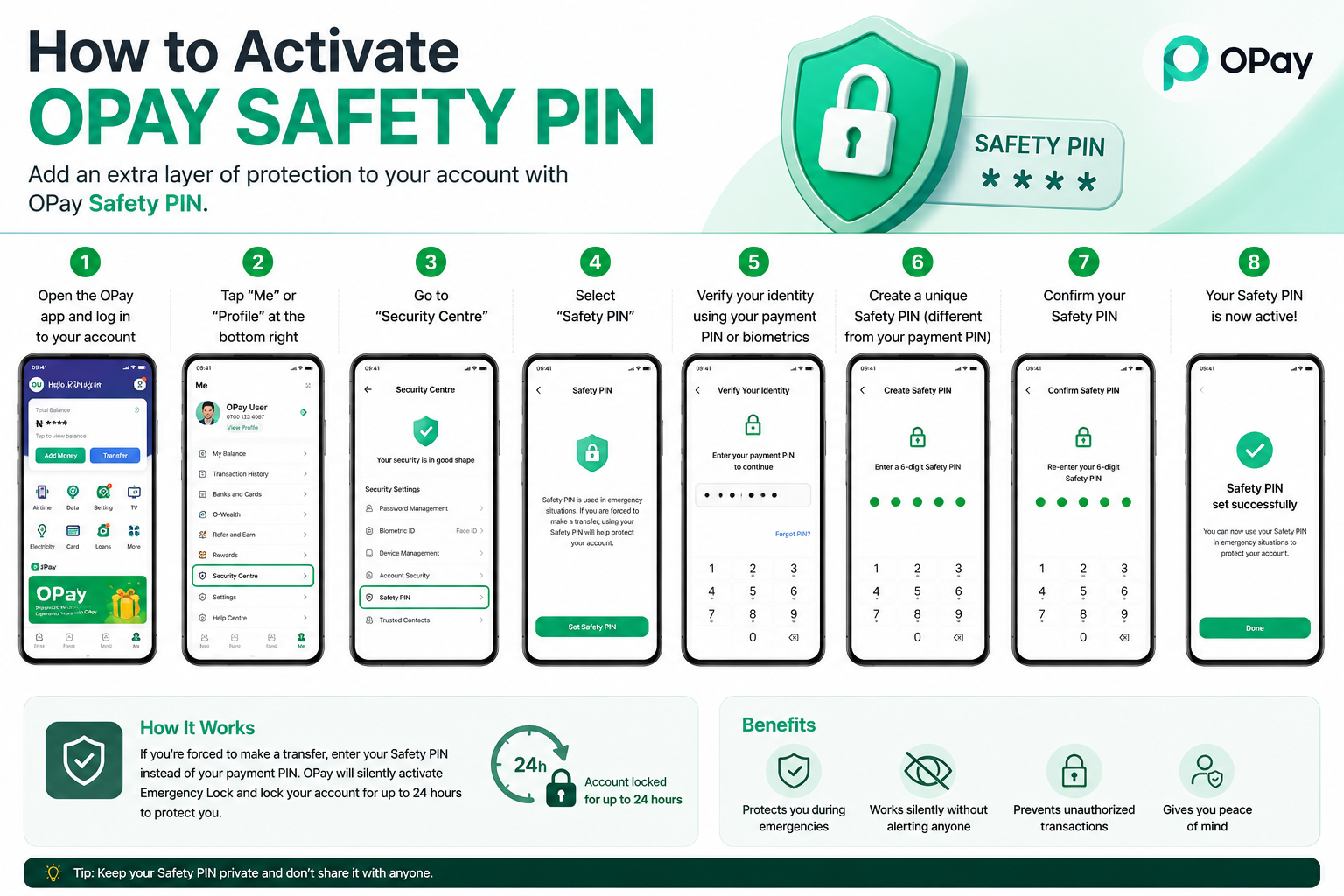
When you enter the Safety PIN during a transaction, OPay automatically places a temporary security lock on your account without alerting anyone nearby. This helps prevent unauthorized access and protects your funds.
How to Activate the OPay Safety PIN
Follow these simple steps:
1.Open the latest version of the OPay app.
2. Log in to your account.
3. Tap Me or Profile.
4. Open Security Centre.
5. Select Safety PIN.
6. Verify your identity using your payment PIN or biometric authentication.
7. Create a unique Safety PIN that is different from your regular payment PIN.
8. Confirm the PIN to complete activation.
Your Safety PIN is now ready to use whenever needed.
How the OPay Safety PIN Works
If you’re in a situation where someone forces you to authorize a transaction:
Enter your Safety PIN instead of your regular payment PIN.
OPay processes the request without revealing that an emergency security action has been triggered.
Your account is automatically locked for up to 24 hours, preventing further outgoing transactions.
You can later regain access by following OPay’s account recovery process.
This silent protection can help reduce financial losses during emergencies.
Benefits of the OPay Safety PIN
1. Protects your money during forced transfers.
2. Adds an extra layer of account security.
3. Works discreetly without notifying the person forcing the transaction.
4. Helps reduce fraud and unauthorized access.
5. Gives users greater confidence when using digital banking services.
What If You Can’t Find the Safety PIN Option?
If the Safety PIN feature isn’t available on your app:
Update OPay to the latest version.
Restart the app after updating.
Ensure your account has completed the required verification.
Wait if the feature is still being rolled out to your account.
Frequently Asked Questions
Is the OPay Safety PIN different from my transaction PIN?
Yes. Your Safety PIN should be different from your normal payment PIN and is only intended for emergency situations.
Is the feature available to everyone?
OPay is gradually rolling out the Safety PIN feature. If you don’t see it yet, update your app and check again later.
Does the Safety PIN notify the attacker?
No. The Safety PIN is designed to work silently without alerting anyone that your account has been protected.
Final Thoughts
The introduction of the OPay Safety PIN is a major step toward improving digital banking security in Nigeria. As online fraud continues to evolve, features like this give users more control and peace of mind.
If you use OPay regularly, activate your Safety PIN as soon as it becomes available. It takes only a few minutes to set up and could help protect your funds when you need it most.